
Where a bug identifier helps and where it stops
A photo tool looks at shape, color and pattern and offers a name. That name is a suggestion. Plenty of unrelated insects share a look, and the same species can change color with age, sex, season and region. So treat the first answer as a lead, not a verdict.
Where a tool is strong is narrowing things down. It can usually tell you that you have a beetle and not a fly, or a moth and not a wasp. Species is harder. If the diagnostic parts are hidden, or two credible sources disagree, the honest label is unknown, and there is no shame in leaving it there.
The people who get reliable answers do the same thing every time. They take more than one photo, they compare the suggested name against an expert-reviewed database, and they check that the range and habitat fit where they found the animal. The rest of this page walks through that method.
Is it an insect at all? Counting legs and checking the body plan
Start with the most basic question, because many things called bugs are not insects. Adult insects have 6 legs and a body divided into head, thorax and abdomen. Spiders and other arachnids have 8 legs. Ticks are arachnids too. Scorpions, centipedes and millipedes are not insects either, and neither are snakes, so a limbless creature belongs in our guide to identifying snakes, even though general visual-search tools may lump them all together.
Counting legs from a photo is not always easy. A crouched beetle or a spider with its legs tucked under can look like it has fewer than it does. If you cannot count them, say so and move on to other clues, such as antennae, wings and the way the body is divided.
If your animal has 8 legs, you are probably better off on our spider identification guide, or the tick identifier page if it is small, flat and attached to skin or fur. If it is a striped or spiky larva with many tiny legs, the caterpillar identifier covers those young moths and butterflies.
The features that settle an identification
Experienced collectors read an insect in a certain order. Whole shape first, then the details. Here is what each feature tells you and what to make sure is visible in the photo.
- Whole-body shape. This sorts the animal into beetle, fly, wasp, true bug, butterfly, moth, spider, tick, millipede or another group before you look at anything fine.
- Leg count. Six points to an insect, eight to an arachnid. Posture can hide legs, so treat a miscount as a photo problem, not a fact.
- Wings. Look at how many there are, their shape, how transparent they are, the color pattern, the resting position and any visible veins. Two wings versus four is one of the quickest ways to separate flies from many bees, wasps, butterflies and moths, provided the wings are in view.
- Antennae. Long or short, thick or thin, clubbed, feathery or thread-like. They are often the first thing lost to a bad angle.
- Mouthparts. Chewing jaws, a piercing beak and a sucking tube point to very different groups, though you need a close-up to see them.
- Body segmentation. Head, thorax and abdomen should be distinct. The shape of the waist is especially useful for separating ants, bees and wasps.
- Color and markings. Spots, stripes, bands, metallic sheen and eye color help, but they vary, so never lean on color alone.
- Surface and texture. Hairs, scales, spines, shell hardness and gloss all narrow the field.
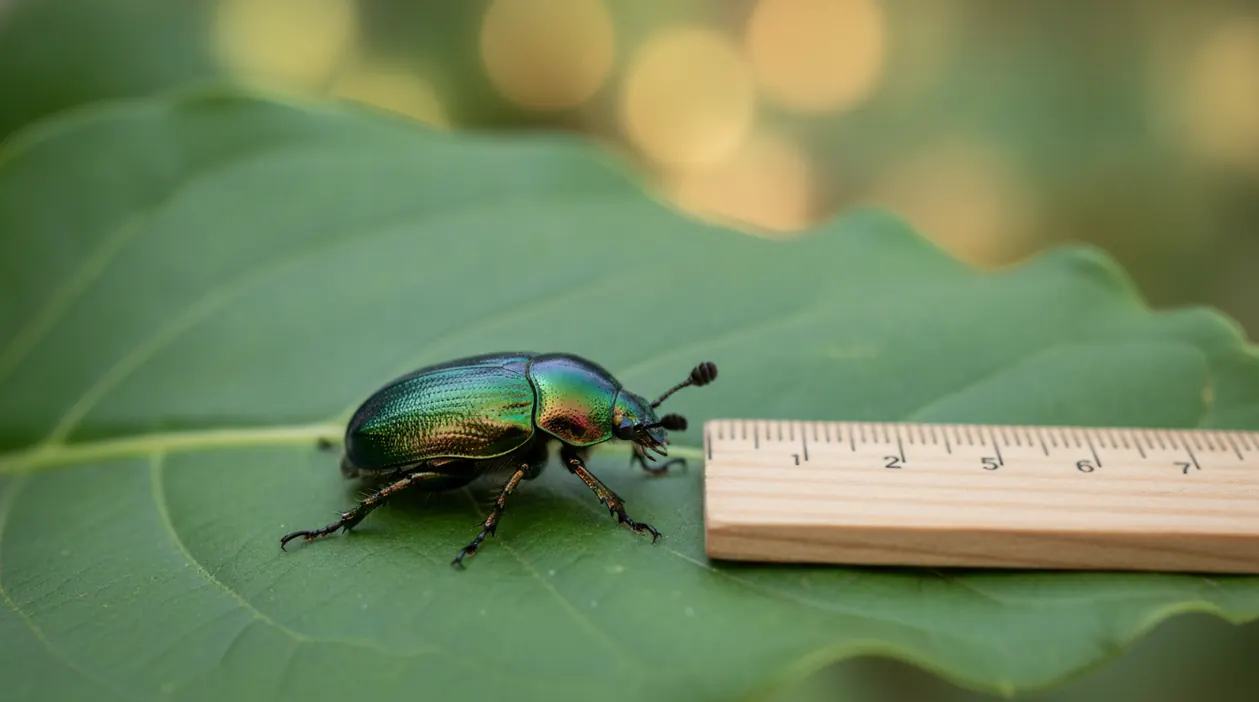
- Size. A bug that looks large in a macro shot may be smaller than a grain of rice. Lay a coin or a ruler next to the insect so its real size shows in the frame.
Where you found it counts as a feature too. Country or state, date, elevation, host plant, indoor or outdoor setting, nearby water and what the animal was doing all rule species in or out. A beetle that lives only in one region cannot be the answer if you found yours somewhere else.
Taking bug photos that an identifier can read
Most failed identifications come from the photo, not the tool. One blurry shot from above hides nearly everything that matters. Work through this order, and keep your hands to yourself while you do it.
- Photograph the whole animal without touching it.
- Take a sharp view from directly above, then one from the side.
- Add close-ups of the head, antennae, legs, wings and any distinctive markings.
- Include a ruler or another size reference in at least one frame.
- Note the exact location, date, habitat, host plant and behavior.
Use optical zoom where you can, and stay at a safe distance. Do not nudge the insect to turn it over. If it flies off, you still have the shots you took, and a missing angle is better than a sting or a bite.
With your clearest images ready, upload the best one for a quick description and a note on how sure the AI is. Think of it as a first pass that tells you which group to research, and then confirm it elsewhere.
Look-alike pairs that fool people
Some pairs trip up beginners and experts alike. Here is how to separate the common ones, and which photo you need to settle each.
Telling a bee from a wasp
Bees are generally hairier, and many have broader, less sharply waisted bodies. Wasps are commonly smoother and more slender. Color alone does not separate them, since both can be yellow and black. Our bee or wasp comparison page goes into more detail, and the waist and the hair are the two things to photograph.
Fly, bee or wasp? Telling them apart
True flies have one functional pair of wings. Bees and wasps have two pairs, though the rear pair can be hard to see. Many flies mimic stinging insects, so a striped body is not enough. Count the wings on a side view or a top view with the wings spread.
Is it a moth or a butterfly?
Antenna shape and the way the wings rest both help, but exceptions occur. You need a clear photo of the wings and the antennae together. Without both, the safest answer is moth or butterfly, with the family left open.
Why red and black does not mean lady beetle
Lady beetles are easy to confuse with other small beetles. Body shape, the pattern on the pronotum and the exact arrangement of the spots matter. Red and black is not diagnostic. Photograph the animal from above and from the side, and count the spots only if you can see them all.
Tick or spider
Both are arachnids, and in a poor photo the legs may be hidden. A close, undistorted view of the whole body usually settles it. If you are looking at something attached to skin, treat it as a medical question and not a photo game.
Harmless mimic or medically important species
Similar body patterns turn up in unrelated species, so a pattern is not a safety label. Do not infer danger, or safety, from an app label or a color pattern alone. That caution applies whether the tool is a camera app, a search engine or a person on the internet.
Free tools to run your photo through
No single tool covers everything. Running the clearest image through two or three, then comparing the names, catches many errors. Here is what the common ones are, based on published comparisons from 2026.
| Tool | What it is | What to know |
|---|---|---|
| Seek by iNaturalist | Free nature app with live camera recognition | Built for quick answers, and according to the cited comparisons it does not require an account |
| iNaturalist | Free mobile and web service | Observations can receive community identifications and corrections, and it works best when you supply location, date and photos |
| Google Lens | Free general visual-search tool | Returns visually similar images and web results, which is not the same as a verified identification |
| BugGuide | Community insect website for the United States and Canada | Hard cases can get specialist help |
| Leps | Free butterfly and moth resource, per one comparison | Useful when you already know you have a lepidopteran |
| Picture Insect | Paid insect app | One comparison reports 3 free identifications per day, and another lists US$29.99 per year in November 2026, so check the current terms in your region |
| BugKnow | Insect app | One comparison claims more than 260,000 species, a figure you should treat as a marketing claim |
Notice the difference between a visual match and a taxonomic match. A search tool that finds pictures that look like yours may show a different species that happens to resemble it. A community platform such as iNaturalist adds people who check range, date and detail, which is why it is a good place to send a hard case. If you want a broader introduction to identifying many kinds of things from a picture, our picture identifier home page is a good start.
What to write down besides the photo
A photo without context loses half its value. Write the exact location and date, the habitat, the plant it was on and what it was doing. Behavior, such as hovering, boring into wood, or crawling on a wall at night, often eliminates whole groups at once.
Photograph the host plant too. If its leaves look damaged, the plant problem page helps you read the damage, and if the plant turns out to be a weed, the weed identification page helps you name it. If you cannot name the plant, try our plant identifier guide first, or our guide to naming houseplants, succulents and cacti if the insect turned up indoors, since many insects feed on only one or two kinds of plant, and a plant name often points straight to the insect.
When to stop at family or order, and when to ask a specialist
Once you have candidate names, compare them against photos on BugGuide or another authoritative regional reference. Then check that the range and the habitat match where you found it. If a candidate lives a thousand miles away, it is probably wrong.
Next, submit the observation to iNaturalist or a regional expert for confirmation. Local natural-history museums, university entomology departments, agricultural extension services, pest-control professionals and regional insect societies may also help, though what they offer and what they charge varies.
If species-level confirmation never arrives, report only the highest level the evidence supports, such as the family or the order. Beetle is a real answer. So is a specific family of flies. Write unknown when the image is blurred, the key structures are hidden or credible sources disagree. A cautious label is more useful to other people than a confident wrong one.
Safety and privacy when you photograph an unknown insect
Do not handle, trap or approach an unknown insect, spider, tick or stinging animal just to get a better image. Keep hands, children and pets away from anything you cannot name. Never use a photo result to decide whether an animal is poisonous, venomous, medically dangerous or safe to eat.
Photos carry more than the insect. An upload can disclose your location, your home address, your workplace, your travel patterns or other personal information. Remove metadata or blur sensitive spots when that matters to you. Publishing an exact location can also expose rare species or collection sites.
Collecting is a separate question. The rules on collecting, photographing or publishing locations depend on jurisdiction and species. Do not collect protected wildlife, specimens, fossils, archaeological objects or plants from restricted land without checking the applicable law and the landowner's rules.
Mistakes that give wrong bug identifications
- Treating an AI suggestion as a confirmed identification.
- Using one blurry photograph.
- Leaving out location, date, size and habitat.
- Photographing only the top, so the legs, antennae and wings are hidden.
- Assuming color alone identifies a species.
- Ignoring regional range and season.
- Calling every small arthropod a bug, or every arthropod an insect.
- Trusting claims about app accuracy, species coverage or subscription limits that no one has verified.
- Handling a potentially dangerous animal to get a close-up.
Fix those and the same tools give you far better answers. The method is dull, which is what makes it work. Several clear photos, a size reference, a note of where you were, and two or three sources that agree.
Questions about bug identifier
How do I identify a bug from a photo?
Take sharp top and side photos plus close-ups of the head, legs, wings and antennae, with a ruler for scale. Note location and date, then compare suggested names with a reliable reference.
What is the best free bug identifier?
Seek by iNaturalist and iNaturalist are free and widely recommended in comparisons. Seek gives quick camera results, while iNaturalist adds community identifications and corrections when you supply photos, location and date.
Can Google Lens identify insects?
Free to use, Google Lens returns visually similar images and web results. That can point you toward a name, but it is not necessarily a verified identification, so confirm against a reference.
How many legs does an insect have?
Adult insects have 6 legs. Spiders and other arachnids have 8, and ticks are arachnids. Posture can hide legs in a photo, so a miscount does not always mean you got it wrong.
Why does a bug identifier give the wrong species for my insect?
A bug identifier only suggests a name from shape, color and pattern. Unrelated insects can look alike, and one species changes color with age, sex, season and region, so a blurry or single photo often misleads.
Are spiders and ticks insects?
No. Spiders and ticks are arachnids with 8 legs. Scorpions, centipedes and millipedes are not insects either, even though some visual-search tools may group them together.
Is a bug identifier app accurate?
A photo result is a suggestion and not proof of species. Accuracy depends on photo quality, visible features, location and the tool, so confirm important results with an expert-reviewed source.
Is it safe to pick up an insect to photograph it?
No. Do not handle, trap or approach an unknown insect, spider, tick or stinging animal for a better image. Photograph from a safe distance and use optical zoom instead.
Where can I get an expert to confirm my bug photo?
Submit it to iNaturalist or BugGuide, which covers the United States and Canada. Natural-history museums, university entomology departments, extension services and regional insect societies may also help.
Sources
- Lilach Bullock, best bug identifier apps
- Ones, 7 free bug apps that identify insects (2026)
- Ones, free bug ID apps compared
- Ones, free app to identify insects compared
- Lens App, best insect identifier apps
- Toolnimba, best insect identification app
- Belvoir, how to identify a bug from a photo
- Downbeach, 6 best free bug identification apps