What a plant photo can and cannot tell you
A photo can often place a plant in a likely group or species. That is useful. It is also where the certainty ends. A picture alone is not proof of identity, edibility or toxicity, and no app counts as an expert certification for a toxic plant.
Plant apps compare what they see with what they have learned, then hand back a short list of candidates. The list is the product. The top name is only the first guess. The confidence score attached to a guess is not a measured probability, so a high score means less than it looks like.
Color rarely settles a plant ID. The features that matter most are flower structure, leaf arrangement, the number and shape of leaflets, hairs, thorns, stem cross-section, fruit type, growth form and the season. One leaf shows you one or two of those at best. That is why a search like identify plant by leaf picture produces so many near misses, and why you should treat a lone-leaf result as a hint, not an answer.
Accuracy also moves around. App performance varies by subject, region, image quality and plant group. Published comparisons use particular species, regions, phones and test images, so one app winning on someone else's test plants says little about the shrub at the edge of your yard.
Taking plant photos that identification can work with
Good photos do more than a better app. Spend two minutes on this routine and most wrong answers disappear.
- Photograph the plant in focus, in natural, even light. Open shade or an overcast sky beats noon sun and flash.
- Take one image of the whole plant with some of its surroundings in the frame.
- Take several close-ups of the parts that carry the ID, listed below.
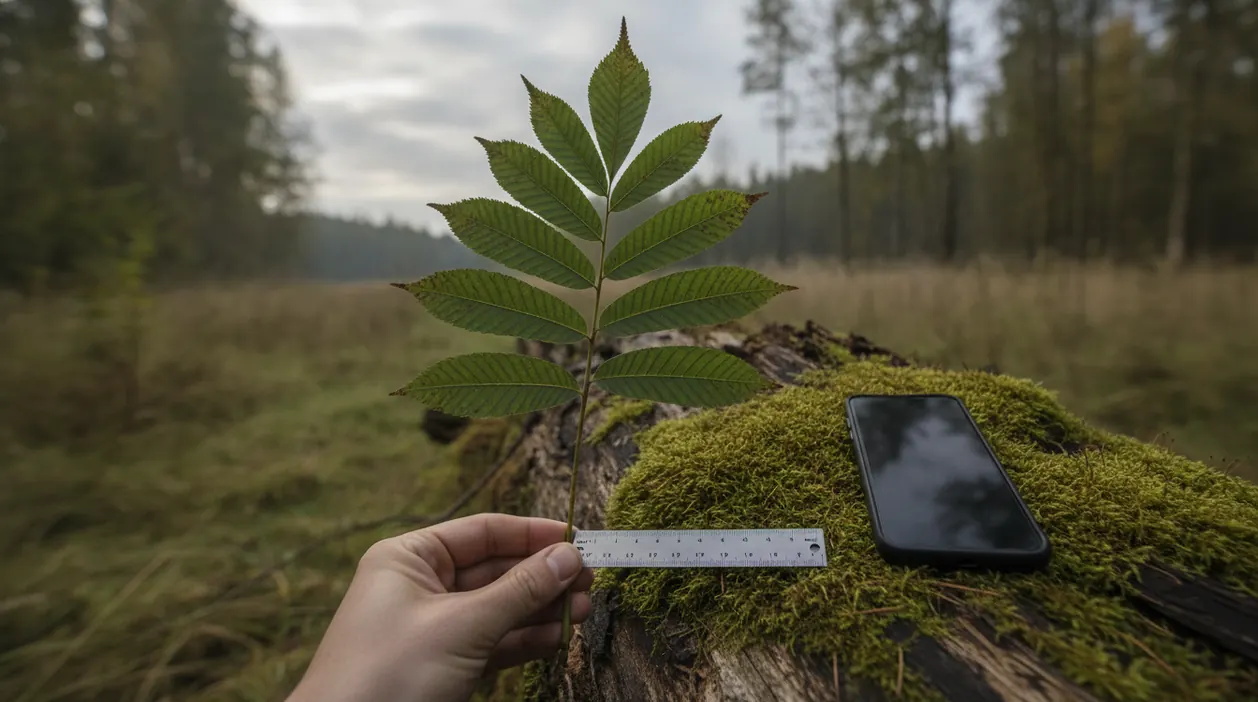
- Put a ruler, coin or other scale object next to the plant for at least one shot.
- Write down the date, location, habitat, size and which plants grow nearby.
- Crop out unrelated clutter, but leave the context that matters, such as the stem a leaf attaches to.
Skip filters. A warmed or saturated image shifts the greens and the flower colors you are trying to read. If a plant is in flower or fruit, those shots are worth more than ten leaf shots.
Which plant parts to photograph
- The whole plant, so the growth form shows: tree, shrub, vine, tuft or low mat.
- Leaf arrangement along the stem, shot from the side so you can see how leaves attach.
- The leaf edge and the full leaf shape, flat against a plain background if you can manage it.
- Leaflets, if the leaf is divided. The number and shape of leaflets separate many lookalikes.
- Stems and bark, including hairs, thorns or any blotching.
- Flowers and buds from the front and the side.
- Fruit and seeds, even if they are old or dried.
- A stem cross-section only where one is already exposed, never by pulling apart a plant you cannot name.
Photo mistakes that lead to wrong answers
Most bad results trace back to the picture, not the software. The usual culprits are photographing only one leaf, using flash, shooting into glare, adding filters, sending a heavily compressed or blurry image, and leaving out scale, habitat, location, date or season.
Plant condition matters too. A damaged, immature or weathered specimen confuses every tool. A seedling in March can look nothing like the same plant in August. For a fast first look, send your best photo through the upload box. The AI looks at the leaves and flowers in your photo and returns a likely name with a certainty score. Like every plant app, it can be wrong.
Free tools that identify a plant from a photo
Several services will take a photo and offer names. As of November 2026 the main ones run on both Apple and Android phones. Prices and features change often, so read the current listing before you rely on any of them.
| Tool | What it does | Worth knowing |
|---|---|---|
| PlantNet | Photo-based plant suggestions, especially for wild plants, with several possible matches and botanical information | Reported to recognize approximately 20,000 plant species in a 2026 overview from FruitPunch AI |
| iNaturalist | Computer-generated suggestions for plants, animals, fungi and other organisms, followed by community review | A free platform with an observation database, so a person can confirm or correct the suggestion |
| Seek by iNaturalist | Real-time camera suggestions for plants, animals and fungi, with badges and challenges | Designed for use without an account |
| Google Lens | General visual search and image matching | It may return a visually similar object instead of the correct species |
| PictureThis, LeafSnap, PlantSnap | Plant photo identification and, depending on the service, care or diagnostic features | Subscription terms can change, so check the listing |
The difference between these tools is mostly what happens after the guess. PlantNet gives you a list with botanical detail, which suits a wild plant you want to study. iNaturalist adds people. Someone who knows the local flora can look at your observation and tell you the app was wrong, which no algorithm does for itself. Seek is the low-friction option for a walk, since it works from the camera and does not ask you to sign up.
Google Lens deserves a plain warning. It is built to find images that look like yours. For a plant, that can mean a similar-looking cultivar or a different species in the same family. Visual similarity and taxonomic identity are not the same thing, and the gap between them is where most misidentifications live.
The paid plant apps often bundle care reminders or problem diagnosis with identification. If your question is really about a houseplant, that may suit you. Just remember that a subscription does not make the identification any more certain.
Checking a plant ID result before you trust it
The first suggestion is a lead. Confirming it takes about five more minutes, and it is the step that separates a hobbyist guess from a usable ID.
- Run the photos through at least two relevant tools. If they agree, your confidence rises. If they disagree, you have learned something too.
- Look up each top suggestion in a regional guide or an authoritative database, not a general web page.
- Check the suggested species' range. A plant native to another continent should make you stop and look again.
- Check season and habitat. A wetland species showing up on a dry ridge is a red flag.
- Compare the distinguishing traits in the guide with your close-ups, one feature at a time.
- Ask a qualified person when the result affects health, safety, conservation, ownership or value.
For that last step, university extension services are a good first stop. North Carolina State University Extension, Iowa State University Extension and Montana State University Extension have all published guidance on using plant identification apps, and extension offices generally take plant questions from the public. Botanical gardens and herbaria are other places where trained people look at specimens.
It also helps to know how little a test can prove. A 2022 Wirecutter test involved 14 staff members and family members, 7 apps, 9 U.S. states and both Android and Apple phones. That is a serious effort, and it still tells you how those apps did on those plants in those places. Use it to see how testers approached the problem, not to rank apps for your garden.
One more habit pays off. Keep your original photo and its metadata. If the record might matter for science, insurance or a legal question, the untouched file with its date and location is worth more than a cropped copy.
Lookalike plants where a wrong ID matters
Most misidentifications are harmless. A few are not. These pairs are worth knowing before you handle anything.
Poison hemlock and wild carrot
Poison hemlock can have purple blotches on its stems and a smooth, often hairless look. Wild carrot commonly has hairy stems and leaves. Those clues help you read a photo, but they are not an edibility test. Do not eat or taste either plant on the strength of a stem texture.
Poison ivy and harmless three-leaf plants
Poison ivy commonly has three leaflets. So do many unrelated plants. The leaflet count alone proves nothing. Confirm with leaf arrangement, leaflet shape, growth habit, habitat and a regional reference. If you cannot be sure, keep your skin away from it and photograph from a distance with the zoom.
Lichens and mosses
A lichen is a partnership involving a fungus and a photosynthetic organism. A moss is a small leafy or stem-like plant. On a rock or a tree trunk they can look alike at arm's length. A close-up of the structure settles it, and an app often cannot do that from a distant shot.
Common names add their own trouble. One common name can refer to several species, and one species can carry many names. When a guide lists a scientific name, copy it down and search on that instead.
When the plant is a weed, a houseplant or a sick plant
Your next step depends on why you wanted a name. If the plant is spreading where you did not plant it, a dedicated weed identifier by picture pays attention to the traits gardeners care about, such as growth habit and seedlings. If it lives in a pot on a windowsill, the page on the houseplant identifier covers the indoor species people ask about most.
Sometimes the name is not the problem. If the leaves are spotted, curled or yellowing, you need a diagnosis more than an ID, and working out what is wrong with a plant starts from different photos. Chewed leaves point to a visitor, so a close shot of the insect on the plant, with the host plant noted, helps a bug identifier far more than a picture of the damage alone, and if the culprit is a larva, our guide to identifying caterpillars and moths can narrow it down.
The same method applies across the site. A photo of almost anything, from a leaf to a rock to a coin, goes through the same logic, and the picture identifier on the homepage handles those other subjects too.
Collecting rules, safety and privacy for plant photos
Do not eat a plant, mushroom or berry based on an app result. Do not touch unfamiliar plants to get a better angle. A zoom lens or your phone's crop tool is safer than a fingertip.
Collecting is a separate question. Rules vary by country, state, park, private property, protected area and species, so there is no single answer. Before you dig up or cut anything, document it with photos in place and check the rules for the land you are on. Leave nests, dens and protected wildlife undisturbed while you do it.
Privacy gets less attention than it should. Exact locations can expose rare plants, nests, dens, archaeological sites or private homes. If you post a photo publicly, remove faces, house numbers, license plates and precise private-property locations. Turn off location tags on sensitive finds. Iowa State University Extension advises reviewing an app's permissions, location settings, account requirements, retention policy, sharing defaults and commercial-use terms before you upload images. That is sensible advice for any service, including free ones.
How to learn plant identification without relying on an app
Apps are a shortcut. The skill underneath them is reading plants, and it is worth having even if you keep using the shortcut.
Start with the traits that did the work in the photo list above. Learn to tell how leaves attach to a stem, how a leaf is divided, what a flower's parts look like and what kind of fruit the plant makes. Pick five plants in your yard or on a regular walk and revisit them through the seasons. The same plant looks different in spring, summer and fall, and seeing that yourself teaches more than a field guide page.
Then add a regional flora or guide for your area. Local references list only what grows near you, which cuts the number of candidates sharply. Herbarium databases and botanical gardens publish comparison records, and extension offices often run plant clinics where staff look at samples.
Keep a notebook or an observation log. Write the date, place, habitat, size and nearby plants every time, the same record you would build before photographing. Posting your observations to a community platform such as iNaturalist invites people with local knowledge to correct you. Being corrected is the fastest way to improve, and it is how most naturalists learned.
An app answer is a place to begin. Treat the name as something to check, compare it with a regional source, and keep a human reviewer in reach for anything that could affect your health or your land. Do that, and you can identify plant by picture quickly and still trust what you end up with.
Questions about identify plant by picture
Can I identify a plant just by snapping a photo?
Yes, apps such as PlantNet, iNaturalist and Seek return suggestions from a photo. Confirm the suggestion with a regional guide before acting on it.
Can an iPhone identify plants?
Yes. though pricing and feature sets shift over time, so read each store listing.
Can AI chatbots identify plants?
A general chatbot can describe a plant photo and suggest a likely name, but it is guessing from what is visible. Confirm with a plant tool and a regional guide.
Which photos help identify a flower?
Photograph flowers and buds from the front and the side, plus the whole plant, leaf arrangement and any fruit. Flowers and fruit shots are worth more than ten leaf shots.
Can I identify plants using a picture for free?
Yes. iNaturalist is a free platform, and Seek by iNaturalist works without an account. The scanner on this page also gives 3 free scans a day.
How can I learn to identify plants without an app?
Learn how leaves attach and divide, what flower parts and fruit look like, and revisit five local plants through the seasons. Add a regional guide and keep an observation log.
How do I identify a plant from a leaf picture?
A single leaf is often insufficient. Add the whole plant, the stem, how the leaves attach, and any flowers or fruit, with a ruler or coin for scale.
Can I eat a plant after an app identifies it?
No. A photo cannot establish edibility or toxicity, and apps are not expert certification. Never eat a plant, berry or mushroom based on an app result.
Sources
- FruitPunch AI, plant identification apps overview
- North Carolina State University Extension, guide to plant ID apps
- Plant identification app comparison (PlantNet and iNaturalist)
- Plant identification app comparison (Seek features)
- Iowa State University Extension, using plant identification apps on smartphones
- Ecobnb, apps to identify wild plants
- Montana State University Extension, plant identification apps
- Wirecutter, best plant identification app